Farm Website Design in North Carolina: What to Build

A North Carolina farm website has one job: tell a visitor, within seconds, what you sell, where you are, when you are open and how to buy. Everything else is decoration. The harder job is keeping those answers true as seasons, hours and inventory change. That is why we build farm sites as a managed subscription: design, hosting and monthly updates in one plan, with every change handled by us, so the site stays accurate without you logging into anything.
This guide covers what to put on the site, how to make it work on a phone, how to get found in your county, and how to keep it fresh.
TL;DR
- Start with four things visitors look for: hours, location, contact information and what you offer. Visit NC Farms names these as the minimum.
- Build a short, clear page structure: Home, About, Products or CSA, and Visit or Contact, with an online store or events page added when you need them.
- Set up a Google Business Profile and use your town and county names in page titles and text so nearby customers find you.
- Review the site monthly. Out-of-season products and old hours cost you visits.
- Our plans start at $29 per month and include design, hosting and updates, so upkeep never lands on your to-do list.
Table of Contents
- Why your website matters to a North Carolina farm
- The pages a farm website needs
- Features that turn visitors into customers
- Design for phones and for everyone
- Getting found in your county
- Keeping the site accurate through the seasons
- What a farm website costs in North Carolina
- Your farm website, handled
- Our view: the site is a part of the farm
- FAQ
- Sources
Why your website matters to a North Carolina farm
Farm visitors check the website more than most owners assume. NC State Extension’s agritourism pilot study found that 57% of North Carolina farm visitors used the farm’s website at some point: 40% before their visit, 9% after and 8% both. The same study showed how people first heard of the farm. Word of mouth led at 43%, followed by driving past at 23%, the farm website at 20% and a search engine at 14%.
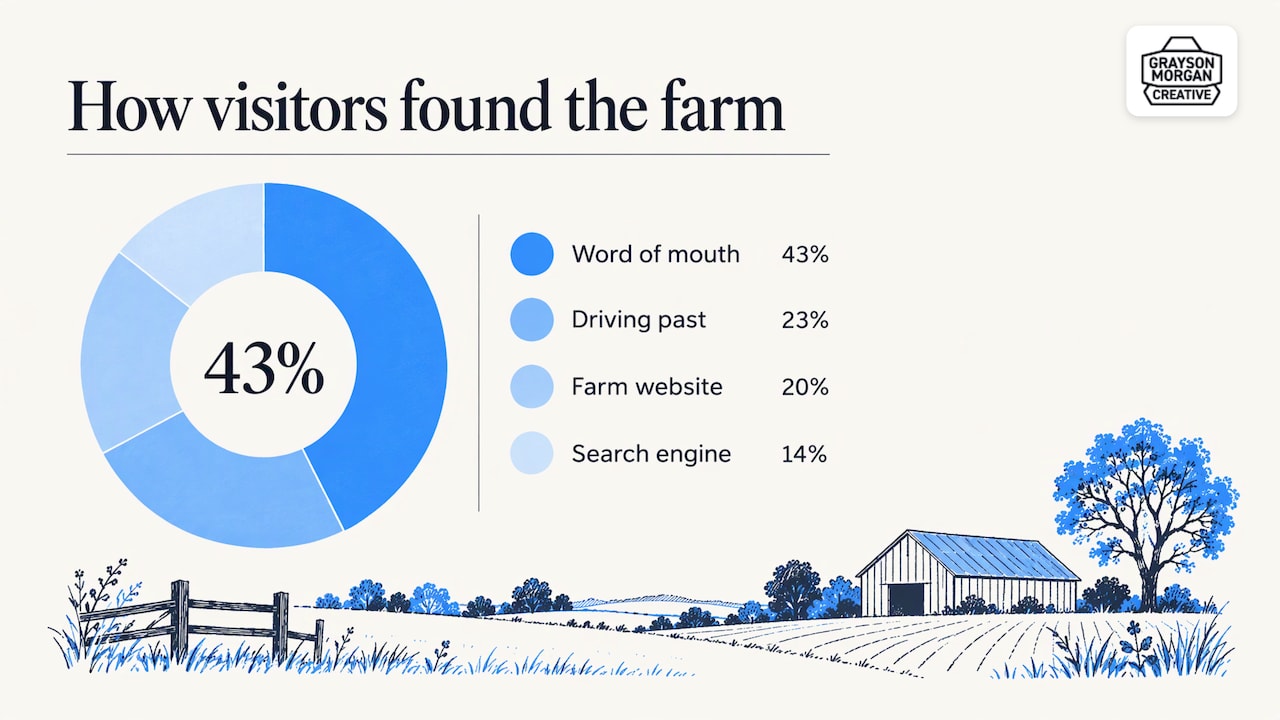
The study is from 2010, and online habits have only deepened since, but its lesson holds. People who hear about you from a neighbor or see your sign on the road still check the website before they drive out. The researchers also found that 34% of visitors plan a trip less than a week ahead. For them the site is a trip-planning tool, so the extension researchers advise keeping contact details, hours and directions current.
A farm website is therefore less a brochure than a front door. If the hours are wrong or the strawberries are listed in August, the visitor does not call to ask. They go elsewhere.
The pages a farm website needs
The USDA Farms Toolkit, hosted by a farming organization, lays out a core set of pages for farm sites. Here they are, with what each should do.
| Page | What it should contain |
|---|---|
| Home | A strong hero image, a one-line tagline and a clear call to action such as “Visit the farm stand” or “Join the CSA” |
| About | Your farm story and values, written warmly and plainly |
| Products or CSA | Photos, pricing, availability dates and a way to sign up |
| Visit or Contact | Hours, address, map and a contact form |
| Online store (optional) | Products customers can order and pay for |
| News or events (optional) | Seasonal happenings, u-pick days, market schedules |
The toolkit also suggests writing the way you would talk at a market booth: warm, clear, no jargon. That advice is easy to agree with and hard to do when you are in the field at 6 a.m. Good copy is short and specific. “Pick-your-own blueberries, Saturdays and Sundays, 9 to 5” beats a paragraph about your passion for the land.
Put the answers above the fold
Visitors should not have to hunt. On the home page, the first screen should say what you sell, where you are and how to buy. Hours and a phone number should be reachable in one tap from every page. If you run a farm stand, a CSA and two farmers markets, each of those channels deserves a plain line explaining how it works.
Tell your story, briefly
The About page is where trust is built. A real photo of you and your land does more than stock imagery. Keep the story to a few short paragraphs: who farms, what you grow or raise, how you do it and why a customer should care. Then link straight to where they can buy.
Features that turn visitors into customers
Once the basics work, features should match how you actually sell. Most North Carolina farms fall into one or more of these patterns.
Selling products online
If customers can order ahead for pickup, delivery or shipping, the website needs a real store with clear prices, weights and pickup windows. A store that takes payment through Stripe and sends order details to your inbox spares you the text-message back and forth. We build online stores with the integrations farms use, and our guide to a farm online store walks through what to sell and how to set it up.
Welcoming agritourism visitors
Orchards, pumpkin patches, wineries and u-pick farms live on weekends and events. Ticketing or registration, a calendar that is actually current and a plain explanation of parking, restrooms and what to bring all reduce questions on busy days. Our agritourism websites for farms and orchards are built around exactly these needs, including booking and registration.
Collecting email addresses
A newsletter signup connected to Mailchimp lets you announce the first tomatoes, a Saturday market or a CSA waitlist opening to people who asked to hear it. Put the signup where visitors already look: the footer, the product page and the event page.
Multiple locations or channels
If you sell at a farm stand and two markets in different towns, give each its own page with its own hours and address. Separate pages for your major sales channels make it easier for customers and for search engines to understand what you offer where.
Design for phones and for everyone
Most visitors will see your site on a phone, often outdoors with a weak signal. Design for that first. A short checklist drawn from the Young Agrarians farmer website toolkit:
- Text readable without zooming
- Paragraphs of two to three sentences
- Plain language and no dead-end pages
- Consistent colors, text styles and logo
- High-quality images and no more than two or three fonts
- Alt text, a short written description, on every image
Alt text matters twice. It helps search engines understand your photos, and it lets people who use screen readers, such as visitors with visual impairments, know what is pictured.
Accessibility is also plain customer service. Low contrast, tiny type, forms that are hard to complete and links that say only “click here” frustrate older customers and anyone on a small screen, not only people with disabilities. Make buttons obvious, make forms short, and make sure a phone number is tappable and an address opens in a maps app.
Getting found in your county
Most people who want what you sell are searching by place: “pasture-raised pork near Asheville” or “pick-your-own strawberries Johnston County”. Winning those searches depends on a few steps.
- Claim a Google Business Profile. The USDA Farms Toolkit recommends a free profile with your farm name, address or service area, hours, website link, photos and a description. Keep it matching the website.
- Use local words naturally. Name your town, county and region in headings and text. A food marketing specialist who works in North Carolina, in a University of California Cooperative Extension webinar, points to local search through the profile and place names as central to farm sales, along with links from directories, local farm organizations, farmers markets and local press.
- Write real titles and descriptions. Each page needs its own title and short description that include a keyword and a call to action.
- Prepare for voice and AI search. The same webinar notes that people increasingly ask questions like “where can I buy local grassfed beef?” Structured data, a behind-the-scenes code format that labels names, prices and stock status, helps search tools read your site.
We handle local SEO, analytics setup and Google Business Profile management as part of our work. Profile management is available as an add-on at $29 per month. For the thinking behind it, see our guides to local business visibility and service area SEO.
Keeping the site accurate through the seasons
This is where most farm websites fail. They launch well, then drift. The summer hours stay up in November. A sold-out product keeps its buy button. The newest event is two years old.
The USDA Farms Toolkit prescribes monthly maintenance: update seasonal availability, add events or news, swap homepage photos and check that forms and links work. In each season, refresh product and CSA pages, post updates to your Google Business Profile and revisit your keywords.
UNH Extension offers a more detailed website review checklist. Its items include:
- Check for outdated links and duplicate listings
- Confirm the domain and security certificate (SSL) are in order
- Test page speed
- Remove out-of-season products
- Confirm prices and pickup windows
- Test the cart, forms and newsletter signup
- Add alt text to new images
- Test everything on a phone
- Keep Google Business Profile details aligned with the site
A monthly review is realistic for a team with a bookkeeper’s patience and a quiet winter. It is much less realistic in the middle of harvest. Our subscription is built so the review is not on you: you never manage a dashboard or make updates yourself, and all changes are handled by Grayson Morgan Creative. You send us the new hours or the new product, and the site changes.
A small rule from experience in this field: if you cannot keep something current, do not publish it. A calendar nobody updates does more harm than no calendar.
What a farm website costs in North Carolina
Traditional web projects often mean a large upfront build fee, then separate bills for hosting, fixes and changes. Our model bundles design, hosting and monthly updates into one subscription so there are no surprise bills. Plans published on our site:
| Plan | Monthly price |
|---|---|
| Launch | $29 per month |
| Growth | $99 per month |
| Systems | $199 per month |
| Scale | $399 per month |
Annual prepay discounts are available. The right tier depends on what your farm needs: a simple informational site sits at the lower end, while online ordering, booking or integrations with other systems point higher. For a broader look at the market, see our website design cost guide for North Carolina.
Your farm website, handled
We build custom websites for farms, with design, hosting and monthly updates in a single subscription. Our farm sites can include online stores, booking and scheduling, ticketing and registration, local SEO and integrations with tools like Stripe and Mailchimp. Marketing sites can go live in as little as two days, and the plans start at $29 per month.

If you run an orchard, a u-pick, a CSA or a farm stand, start with our page on agritourism websites for farms and orchards, or see all plans on our homepage. For a longer walkthrough of what to build, read Farm Website Design: What to Build and How to Keep It Fresh.
Our view: the site is a part of the farm
We think of a farm website the way a farmer thinks of a fence. It is not exciting, and nobody admires it until it fails. A gate that is open when it should be shut costs you livestock. A website that says you are open when you are not costs you customers who drove out and left unhappy.
That is why we do not hand over a site and wish you luck. Most farmers we talk to want to farm, not manage a dashboard. So we built our subscription around the idea that design, hosting and monthly updates belong together, and that changes should be done for you. Send us the new market schedule, we publish it.
Our approach is custom design for your sector, quick turnaround, bundled support and integrations with the tools you already use, without hidden fees. A farm in North Carolina has its own rhythm: spring plant sales, summer markets, fall festivals, winter planning. The site should keep that rhythm too.
Grayson
FAQ
What should a North Carolina farm put on its website first?
Start with hours, location, contact information and what you offer, the four items Visit NC Farms says a farm site should always carry. Then add photos, prices and a clear way to buy or visit.
Do I need an online store?
Not every farm does. If customers mainly buy at the stand or market, a Products page with seasonal availability and prices may be enough. If you take pre-orders, ship, or run a CSA, an online store with payments saves you time. We can build either.
How often should a farm website be updated?
At least monthly, and whenever hours, prices or availability change. The USDA Farms Toolkit lists monthly tasks such as updating seasonal products and events and checking forms and links. With our plans, we make those changes for you.
How do I show up when people search near me?
Claim a Google Business Profile, keep it consistent with your website and name your town and county in your page text. We offer Google Business Profile management as an add-on for $29 per month.
How fast can a farm website go live?
Marketing sites can go live in as little as two days with us. Sites with online stores, booking or custom integrations take longer to plan, since more has to be set up.
Sources
- Visit NC Farms: marketing best practices for agritourism operators
- NC State Extension: Agritourism in North Carolina, pilot study summary
- USDA Farms Toolkit
- Young Agrarians: DIY Website Toolkit for Farmers and Food Producers
- UC ANR: Beyond the Basics, SEO, Social Media and Paid Ads
- UNH Extension: Website Checklist